overscroll-behavior-y CSS property
Limited availability
This feature is not Baseline because it does not work in some of the most widely-used browsers.
Want more browser support for this feature? Tell us why.
The overscroll-behavior-y CSS property sets the browser's behavior when the vertical boundary of a scrolling area is reached.
See overscroll-behavior for a full explanation.
Syntax
/* Keyword values */
overscroll-behavior-y: auto; /* default */
overscroll-behavior-y: chain;
overscroll-behavior-y: contain;
overscroll-behavior-y: none;

/* Global values */
overscroll-behavior-y: inherit;
overscroll-behavior-y: initial;
overscroll-behavior-y: revert;
overscroll-behavior-y: revert-layer;
overscroll-behavior-y: unset;
Values
This property is specified as one of the following keyword values:
auto-
Allows the default behavior at a scroll boundary. Scrolling may continue in another scroll container.
chain-
Allows scrolling to continue outside the scroll container, but prevents overscroll "bounce" effects.
contain-
Prevents scrolling from continuing outside the scroll container. "Bounce" effects may still occur.
none-
Prevents scrolling from continuing outside the scroll container and also prevents overscroll "bounce" effects.
Formal definition
| Initial value | auto |
|---|---|
| Applies to | non-replaced block-level elements and non-replaced inline-block elements |
| Inherited | no |
| Computed value | as specified |
| Animation type | discrete |
Formal syntax
overscroll-behavior-y =
  contain  |
  none     |
  auto     |
  chain
Examples
Preventing an underlying element from scrolling
In our overscroll-behavior example (see the source code also), we present a full-page list of fake contacts, and a dialog box containing a chat window.
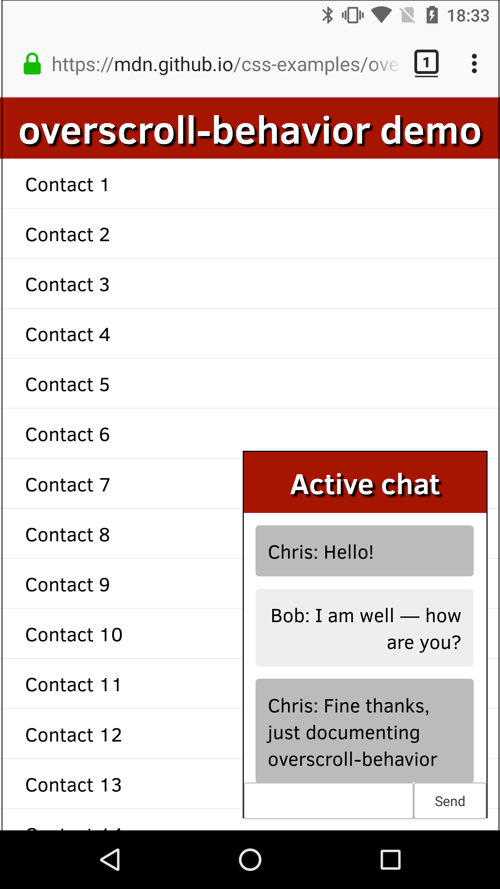
Both of these areas scroll; normally if you scrolled the chat window until you hit a scroll boundary, the underlying contacts window would start to scroll too, which is not desirable. This can be stopped using overscroll-behavior-y (overscroll-behavior would also work) on the chat window, like this:
.messages {
  height: 220px;
  overflow: auto;
  overscroll-behavior-y: contain;
}
We also wanted to get rid of the standard overscroll effects when the contacts are scrolled to the top or bottom (e.g., Chrome on Android refreshes the page when you scroll past the top boundary). This can be prevented by setting overscroll-behavior-y: none on the <html> element:
html {
  margin: 0;
  overscroll-behavior-y: none;
}
Specifications
| Specification |
|---|
| CSS Overscroll Behavior Module Level 1 # overscroll-behavior-longhands-physical |